In this article
To start an online store in India, pick a focused range of items, get your catalogue ready, choose a store platform, decide how customers will pay and how orders will reach them, check your GST and packaging duties, then share your store link with the customers you already have. You don't need a developer or a big budget to do this.
The harder part comes after launch: every order still has to become an invoice, reduce your stock and be collected. So plan the store and the work behind it together. This guide walks through both.
Step 1: Decide who you are selling to
Write one sentence: "I sell [these items] to [these customers] in [this area]." It decides almost everything that follows.
- Existing customers first. If you already have regular buyers, a store is a faster way for them to reorder. You don't need ads on day one.
- Local or all India? Local delivery is simpler to run. Shipping across states adds courier costs, returns and GST steps.
- Retail or bulk? Bulk buyers care about pack sizes and rates. Retail buyers care about photos and delivery charges.
Step 2: Start with a small, clean catalogue
Don't wait until every item is listed. Start with the items that already sell well. For each one, get these ready:
| What you need | Why it matters |
|---|---|
| A clear item name | Customers search with the words they use, not your internal code |
| 2 to 4 good photos | Buyers can't touch the item, so photos do that job |
| Price and pack size | Confusion here brings WhatsApp questions and abandoned carts |
| Category | Helps customers browse and helps search engines understand the page |
| A short description | Size, material, use, and what's in the box |
| Stock quantity | Stops you selling what you don't have |
A plain background and daylight are enough for good photos. Our guide on item photos covers this in more detail.
Step 3: Choose how you will build the store
You have three broad options.
| Option | Good for | Watch out for |
|---|---|---|
| Your own website, built by a developer | Unusual requirements | Cost, and every later change depends on someone else |
| A website-only store builder | Businesses that only need a storefront | Orders, invoices and stock may sit in separate software |
| A store connected to your billing | Businesses that also need invoices, stock and dues | Check that it fits your range of items |
If you're still deciding between chat and a proper store, read WhatsApp catalog vs online store.
With KhataBhai, you enter a store name and a store link, press Create Store, and your items become the catalogue. Your store gets a link like khatabhai.com/shop/your-shop, and you can connect your own domain later. See how the Online Store works.
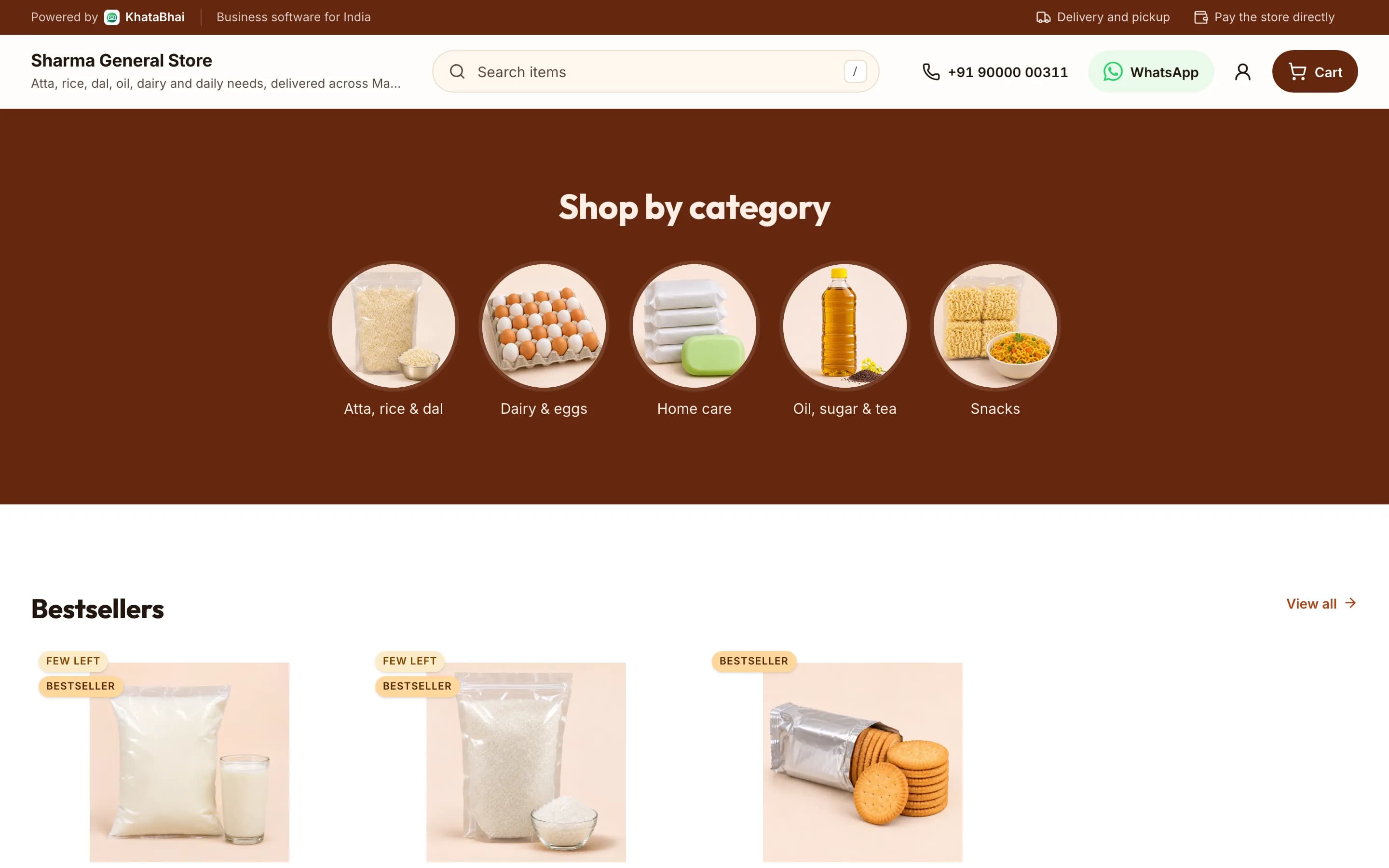
A sample store, shown with demo data.
Step 4: Decide how customers will pay
Most new stores in India start with payment on delivery, then add online payment. You don't need everything on the first day.
- Pay on delivery or at pickup: easy to start with, but you carry the risk of refused orders.
- Online payment at checkout: the customer pays before you ship, through a payment gateway connected to your store.
Our guide on accepting online payments compares these and explains what they cost.
On a KhataBhai store: Customers pay you on delivery or at pickup. To take payment online at checkout, connect your own payment gateway account.
Step 5: Set up delivery before you get orders
Answer these before you share your link:
- Which areas will you deliver to, and which will you refuse?
- Is there a minimum order?
- What will you charge: free, a flat charge, by distance, by weight or a percent of the order?
- Above what amount is delivery free, if at all?
- How many days will delivery take, and who will do it?
Write the answers on your store. Unclear delivery charges are a common reason for dropped carts, and a charge that surprises the customer at the door causes refused orders.
Weigh and measure your common items now. You'll need those numbers for courier rates, and they're much harder to collect later.
Step 6: Check your GST and legal duties
This is the step people skip. Three things to check with your CA:
- GST registration. Registration normally depends on turnover, but Section 24 of the CGST Act makes it compulsory for certain cases, including inter-State taxable supplies. So if you plan to ship goods to other states from your own store, ask about this first. The relief for small sellers in Notification 34/2023 is about selling through a marketplace that collects TCS, so don't assume it covers your own website.
- Consumer rules. The E-Commerce Rules, 2020 expect online sellers to share details such as business and contact information, return, refund, delivery and payment terms, and a way to raise complaints. How each rule applies to a small business is a question for your CA or lawyer.
- Product rules. Packaged goods need the mandatory declarations shown online too, under the Legal Metrology rules. Food sellers should also check their FSSAI duties.
Keep your invoices correct from the first order. Our guide to the GST invoice format lists the required fields.
Step 7: Get your store ready for Google
You can't buy your way into the free results, and no one can promise you a ranking. But you can give Google clear pages:
- Use real item names and write your own descriptions instead of copying the manufacturer's.
- Add your city or service area where it's true and useful.
- Create a Google Business Profile if customers can visit you or you travel to them.
- Fill in the search title and description on your most important items.
On KhataBhai, each item has a Search engine title, a Meta description and a URL handle. Live stores also get a sitemap automatically, covering categories and items.
Step 8: Plan what happens after an order
This is where a lot of new stores struggle. An order arrives on your phone, someone copies it into billing software, stock gets updated later or not at all, and dues go into a notebook.
Before launch, walk through one test order and ask:
- Who sees the order first, and how fast?
- Who confirms the stock and accepts it?
- When is the invoice created?
- When does stock go down?
- Who packs and delivers it?
- How is payment recorded against the invoice?
In KhataBhai, a store order arrives as a Sales Order. You accept it, an invoice is created, and stock and dues move at the invoice, not at the order. If the customer pays on delivery, you record that payment against the invoice.
Step 9: Get your first orders
Start with people who already know you. That's cheaper than ads and teaches you what's broken.
- Message your existing customers who have agreed to hear from you. Include the store link and one reason to try it.
- Add the link everywhere: your WhatsApp status and profile, Instagram bio, invoices and visiting cards.
- Ask your first buyers what confused them. Fix that before you spend on ads.
- Run ads only when your store converts. Paid traffic on a store that doesn't convert burns money quickly.
What it costs to run
Don't compare only the software fee. Your real costs are:
| Cost | How it works |
|---|---|
| Store platform | Monthly or yearly fee. Compare what's included, not just the price |
| Own domain | Optional yearly fee to your domain registrar |
| Payment charges | Set by your gateway agreement. Compare the rate for each payment type |
| Courier | Depends on weight, size and distance. Returns often cost extra |
| Packaging | Small per order, but it adds up. Also affects damage and returns |
| Photos and content | Your time, or a small one-time cost |
For UPI, merchants should note the Finance Ministry's FAQ: since 15 October 2026, charges apply on certain merchant payments above ₹2,000, while small merchants receiving up to ₹1 lakh a month through person-to-merchant UPI stay at zero. Read the details in the sources below or ask your payment provider.
KhataBhai's plans and what each includes are on the pricing page.
Common mistakes to avoid
- Listing hundreds of items with poor photos instead of 30 good ones
- Hiding delivery charges until checkout
- Selling items that are out of stock because the store and stock aren't connected
- Treating the store as separate from invoices and dues
- Spending on ads before your existing customers have tried the store
- Copying descriptions from another website
Frequently asked questions
Can I start an online store without GST?
It depends on what you sell, your turnover and where you ship. Inter-State supply of goods generally needs registration under Section 24, so confirm your case with a CA before you ship outside your state.
Do I need my own website?
No. A hosted store with a link is enough to start. Connect your own domain when you're ready.
Should I sell on marketplaces or my own store?
Many businesses do both. A marketplace brings its own buyers, with its fees and rules. Your own store is for customers you bring, and those relationships and repeat orders stay with you.
How long does it take to get found on Google?
There's no fixed time, and it depends on your site, your competition and your content. Share the link with existing customers from day one so you aren't waiting for search traffic.
Sources
- Consumer Protection (E-Commerce) Rules, 2020
- CGST Act, Section 24: compulsory registration
- Legal Metrology (Packaged Commodities) Rules, 2011
- Ministry of Finance FAQ on UPI merchant charges, September 2026
General information as of 31 Oct 2026, not tax or legal advice. Rules change, so confirm your own case with your CA.